Computer Use Architecture Deep Dive
A deep dive into the Computer Use implementation: from MCP tool definitions to Python Bridge, from 9-layer security gates to local capability enablement.
Local Implementation · Layered Architecture · MCP Tool Layer · Security Gates · Python Bridge · Interaction Loop · Source File Index
1. Local Implementation Overview
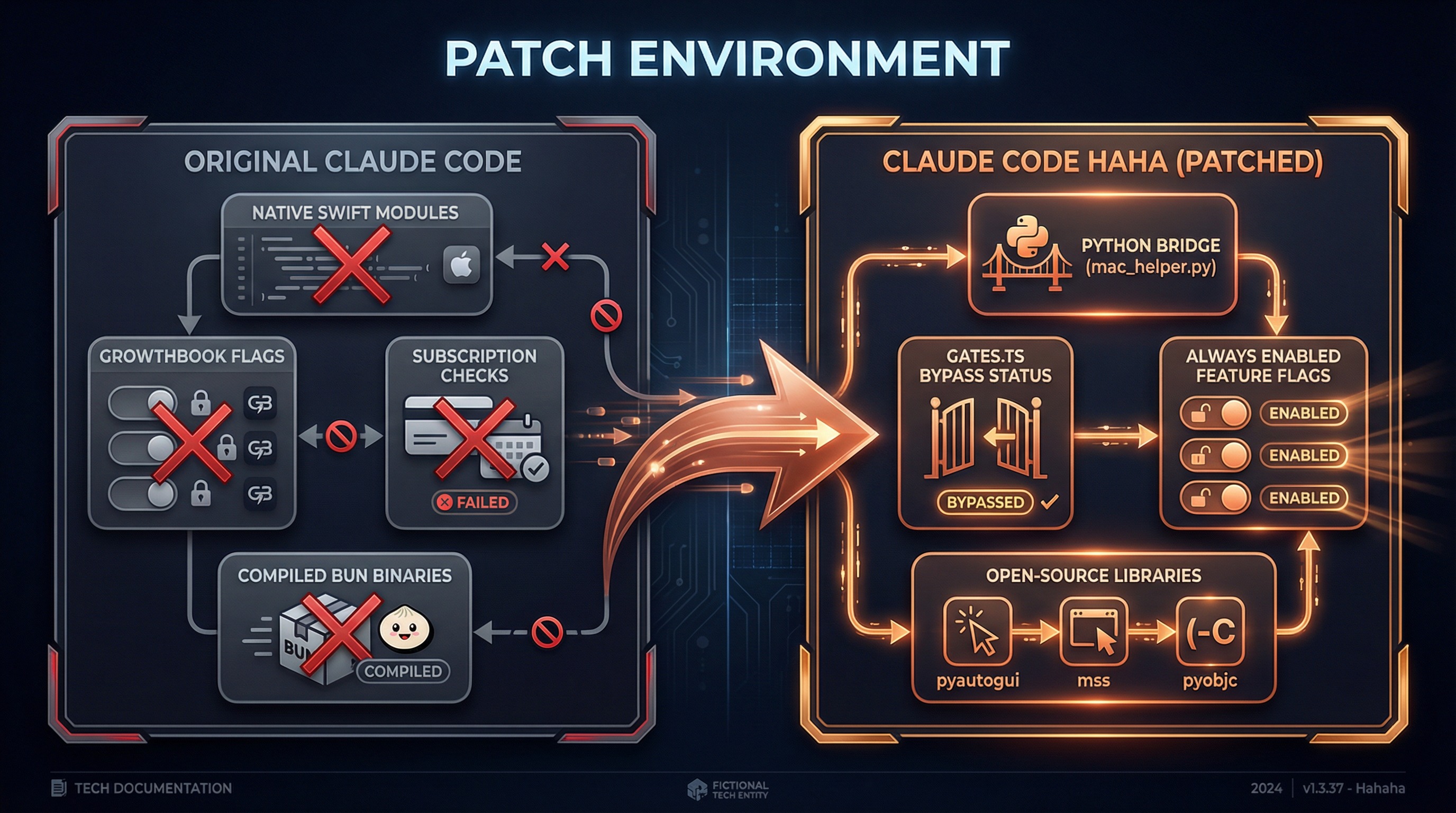
The upstream Computer Use interaction model depends on platform-specific execution layers and remote configuration. EchoFlow Code localizes these capabilities through a Python Bridge and local configuration.
| Component | Purpose | EchoFlow Code implementation |
|---|---|---|
| Screenshots and display enumeration | Read screen/display state | Python Bridge + mss / pyobjc |
| Mouse/keyboard simulation | Execute local input actions | Python Bridge + pyautogui |
| Capability switch | Control Computer Use availability | Local config and startup flags |
Our approach: preserve the MCP tool definitions and security mechanisms, implement the execution layer with publicly installable Python dependencies, and control availability through local configuration.
What We Changed
Upstream interaction model              EchoFlow Code local implementation
────────────────────                    ─────────────────────────────────
Platform screenshots/display state ──localized──→ Python Bridge (mac_helper.py)
Platform mouse/keyboard input      ──localized──→ pyautogui + pyobjc
Remote feature flags               ──localized──→ local config controls availability
Session safety checks              ──preserved──→ app allowlists, OS permissions, sensitive-action checks
What We Kept Intact
- MCP tool definitions (24 tools with their schema and parameter validation)
- 9-layer security gates (TCC permissions, app allowlist, permission tiers, pixel validation, etc.)
- App classification system (191 bundle IDs categorized with permission mappings)
- Session context management (global lock, screenshot cache, state synchronization)
- Keyboard shortcut blocklist (system-level dangerous operation interception)
Capability Enablement
The current implementation controls Computer Use availability through local configuration:
// gates.ts (simplified)
function getComputerUseEnabled(): boolean {
  return readLocalConfig() && !isDisabledByStartupFlag()
}
Sub-switches such as pixelValidation and mouseAnimation remain configurable; session-level safety checks stay active.
2. Layered Architecture
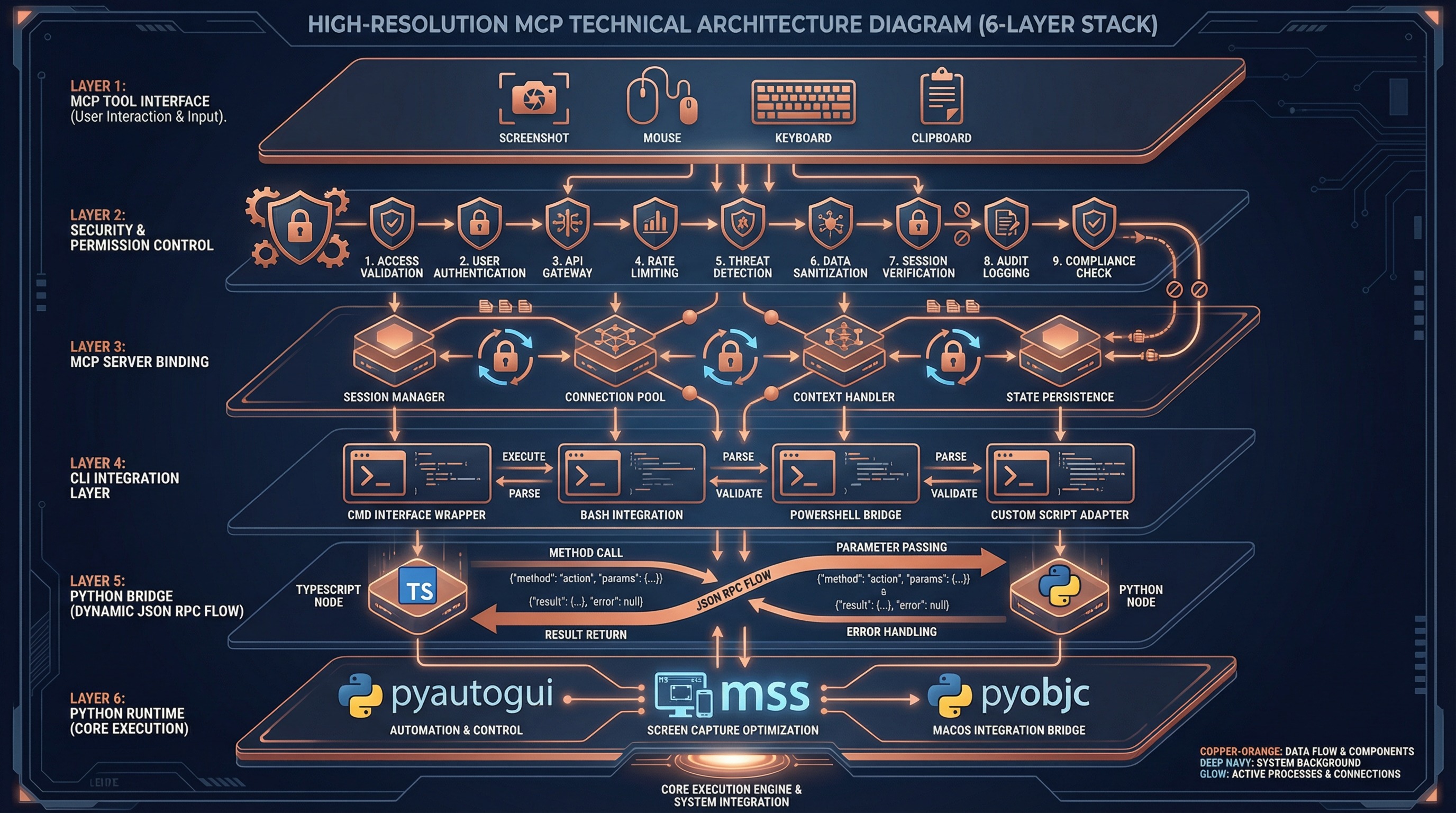
Computer Use uses a 6-layer architecture with clear responsibilities and boundaries:
┌─────────────────────────────────────────────────────────────┐
│  Layer 1 — MCP Tool Interface                               │
│  tools.ts: 24 tool schemas + parameter validation           │
│  buildComputerUseTools() → MCP Tool Definition              │
├─────────────────────────────────────────────────────────────┤
│  Layer 2 — Tool Dispatch & Security Control                 │
│  toolCalls.ts: handleToolCall() + 9 security gates          │
│  deniedApps.ts: 191 app classifications + permission tiers  │
├─────────────────────────────────────────────────────────────┤
│  Layer 3 — MCP Server Binding                               │
│  mcpServer.ts: session context + global lock + screenshot   │
│  bindSessionContext() → per-call overrides                  │
├─────────────────────────────────────────────────────────────┤
│  Layer 4 — CLI Integration                                  │
│  wrapper.tsx: permission dialogs + state read/write         │
│  setup.ts: MCP config initialization                        │
│  gates.ts: local capability enablement                        │
├─────────────────────────────────────────────────────────────┤
│  Layer 5 — Python Bridge IPC                         [LOCAL] │
│  pythonBridge.ts: venv mgmt + JSON RPC + error handling     │
│  callPythonHelper<T>(command, payload) → T                  │
├─────────────────────────────────────────────────────────────┤
│  Layer 6 — Python Runtime Execution                  [LOCAL] │
│  mac_helper.py: pyautogui + mss + pyobjc                    │
│  660 lines of Python implementing all system interactions   │
└─────────────────────────────────────────────────────────────┘
Layers marked [LOCAL] are EchoFlow Code's local execution layers. The other layers preserve MCP tools and safety mechanisms.
Why This Layering?
| Layer | Source | Reusability |
|---|---|---|
| Layer 1-2 | vendor/computer-use-mcp/ | Platform-agnostic, reusable for Electron, Web hosts |
| Layer 3 | vendor/computer-use-mcp/ | Platform-agnostic, standard MCP protocol |
| Layer 4 | utils/computerUse/ | CLI-specific, bound to app state |
| Layer 5-6 | utils/computerUse/ + runtime/ | macOS-specific, Python implementation |
3. MCP Tool Layer
24 Tools Overview
Computer Use exposes 24 tools to the model via MCP (Model Context Protocol):
| Category | Tools | Permission Tier |
|---|---|---|
| Permission | request_access, list_granted_applications | None required |
| Screenshot | screenshot, zoom | read |
| Mouse Click | left_click, double_click, triple_click | click |
| Mouse Advanced | right_click, middle_click, left_click_drag | full |
| Mouse Move | mouse_move, cursor_position, scroll | click |
| Mouse Low-level | left_mouse_down, left_mouse_up | full |
| Keyboard | type, key, hold_key | full |
| Application | open_application, switch_display | full |
| Clipboard | read_clipboard, write_clipboard | full |
| Batch | computer_batch | Inherits from sub-operations |
| Wait | wait | None required |
Coordinate System
The model interacts with the screen through two coordinate modes:
pixels mode (default):
  Model sees screenshot size (1176 x 784)
  Model outputs coordinate [588, 392]
  scaleCoord() conversion:
    x_logical = (588 * displayWidth / 1176) + originX
    y_logical = (392 * displayHeight / 784) + originY

normalized_0_100 mode:
  Model outputs coordinate [50, 50] (percentage)
  scaleCoord() conversion:
    x_logical = (50 / 100) * displayWidth + originX
    y_logical = (50 / 100) * displayHeight + originY
Screenshot dimensions are calculated by imageResize.ts to ensure:
- Long edge <= 1568 pixels
- Token budget <= 1568 (vision encoder at 28px/token)
- Aspect ratio preserved
App Classification System
deniedApps.ts precisely classifies 191 applications:
Browsers (55 bundle IDs) -> tier read
Safari, Chrome, Firefox, Arc, Edge, Opera, Brave, Vivaldi...
Reason: browser operations should use Chrome MCP, not blind clicking
Terminals (102 bundle IDs) -> tier click
Terminal, iTerm2, VS Code, Cursor, JetBrains IDEs, Xcode...
Reason: terminal operations should use Bash Tool, limited to click only
Trading (34 bundle IDs) -> tier read
Webull, Fidelity, Interactive Brokers, Binance, Kraken...
Reason: financial operations are extremely high-risk, screenshot only
Completely Blocked (policy deny list):
Netflix, Spotify, Apple Music, Kindle...
Reason: copyright compliance, rejected without permission dialog
4. Security Gate System
Every input action (click, keyboard, drag) must pass through 9 security gates before execution:
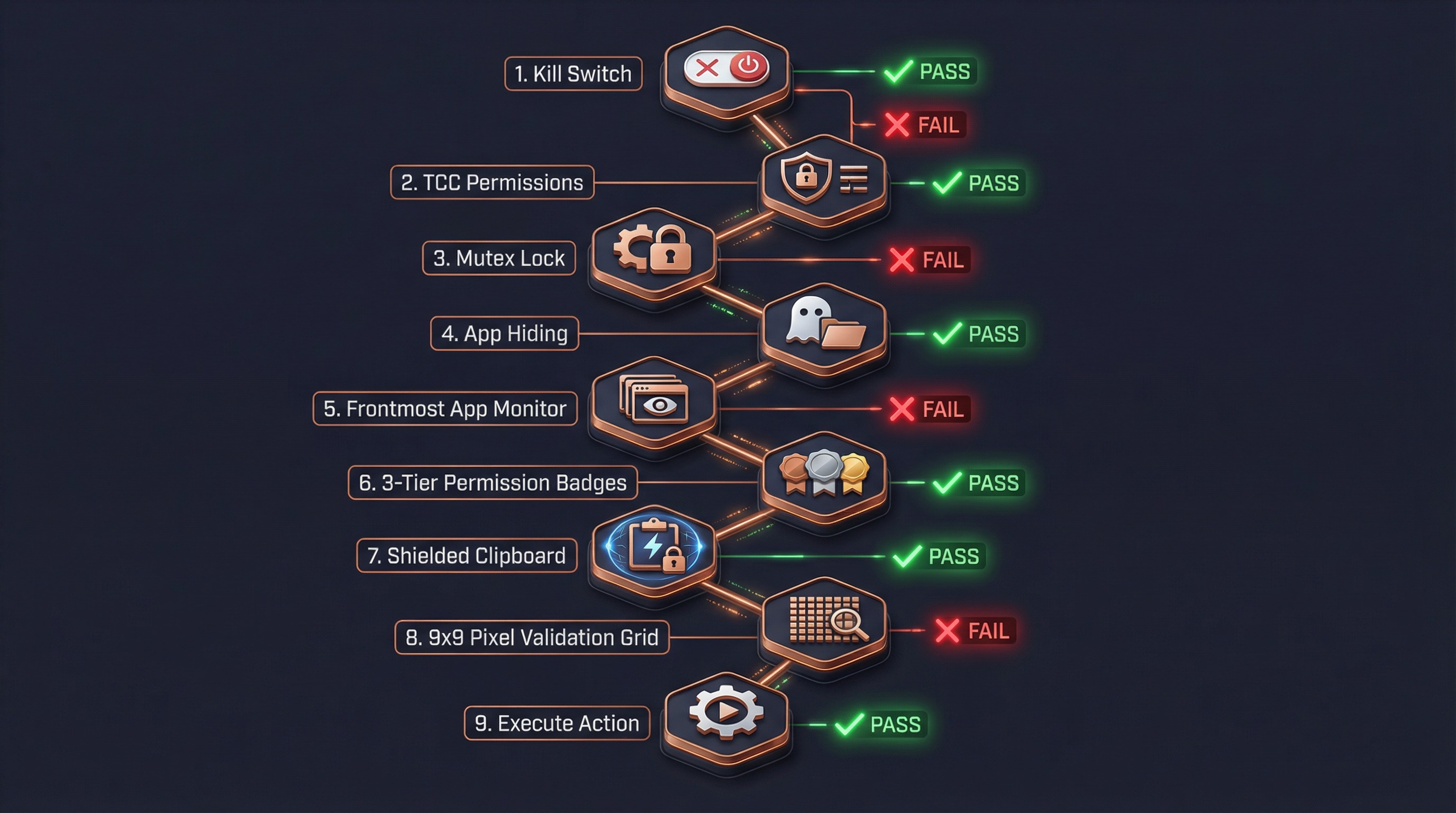
Gate Details
Gate 1: Kill Switch
if (adapter.isDisabled()) return errorResult("Computer Use is disabled")Reads the local enabled state; if disabled through environment variables or config, Computer Use is not injected.
Gate 2: TCC Permission Check
await adapter.ensureOsPermissions()
// → Python: check_permissions
//   → Accessibility: osascript "tell System Events..."
//   → Screen Recording: CGDisplayCaptureDisplay()
Reports error if macOS Accessibility or Screen Recording permissions are missing.
Gate 3: Global Mutex Lock
await tryAcquireComputerUseLock(sessionId)
// File lock: ~/.claude/computer-use.lock
// JSON: { sessionId, pid, acquiredAt }
Ensures only one Claude session can control the computer at a time. Supports stale PID recovery.
Gate 4: Hide Non-Allowlisted Apps
await executor.prepareForAction(allowlistBundleIds)
// Hide all app windows not in the allowlist
// Ensures screenshots only contain authorized apps
Gate 5: Frontmost App Check
const frontmost = await executor.getFrontmostApp()
if (!allowlist.includes(frontmost.bundleId)) {
  return errorResult("Application not authorized")
}
Even after passing the allowlist, verifies the current foreground app is authorized.
Gate 6: Permission Tier Check
Three-tier permission model:
| Tier | Allowed Operations | Prohibited Operations |
|---|---|---|
read | Screenshot viewing | Any input action |
click | Left click, scroll | Right-click, drag, keyboard input |
full | All operations | No restrictions |
function tierSatisfies(tier: CuAppPermTier, required: ActionKind): boolean {
  const order = { read: 0, click: 1, full: 2 }
  return order[tier] >= order[required]
}Anti-subversion: If permissions are insufficient, the response includes a TIER_ANTI_SUBVERSION hint to prevent the model from bypassing restrictions via AppleScript or System Events.
Gate 7: Clipboard Guard
Threat model:
1. Agent calls write_clipboard("rm -rf /")
2. Switches to Terminal (click-tier allows clicking)
3. Model clicks Terminal's paste button
4. Malicious command executedProtection:
When click-tier app becomes frontmost:
  → Save current clipboard content (stash)
  → Clear clipboard
  → Re-clear after each operation

When non-click-tier app becomes frontmost:
  → Restore original clipboard content
Gate 8: Pixel Validation (Staleness Guard)
Last screenshot              Current actual screen
┌────────────┐              ┌────────────┐
│   Button A  │              │   Dialog    │  ← UI has changed
│  [756,342]  │              │  Confirm?   │
└────────────┘              └────────────┘

Validation: sample 9x9 pixel grid at [756,342]
  → Compare last screenshot vs live screenshot pixels
  → Different → reject click + prompt to re-screenshot
→ Same → allow clickNote: In patched version, pixelValidation is off by default (hostAdapter.cropRawPatch() returns null).
Gate 9: System Shortcut Interception
keyBlocklist.ts blocks dangerous shortcuts:
| Shortcut | Dangerous Action |
|---|---|
Cmd+Q | Quit application |
Shift+Cmd+Q | Log out |
Option+Cmd+Esc | Force quit dialog |
Cmd+Tab | App switcher |
Cmd+Space | Spotlight |
Ctrl+Cmd+Q | Lock screen |
5. Python Bridge Mechanism
Architecture Design
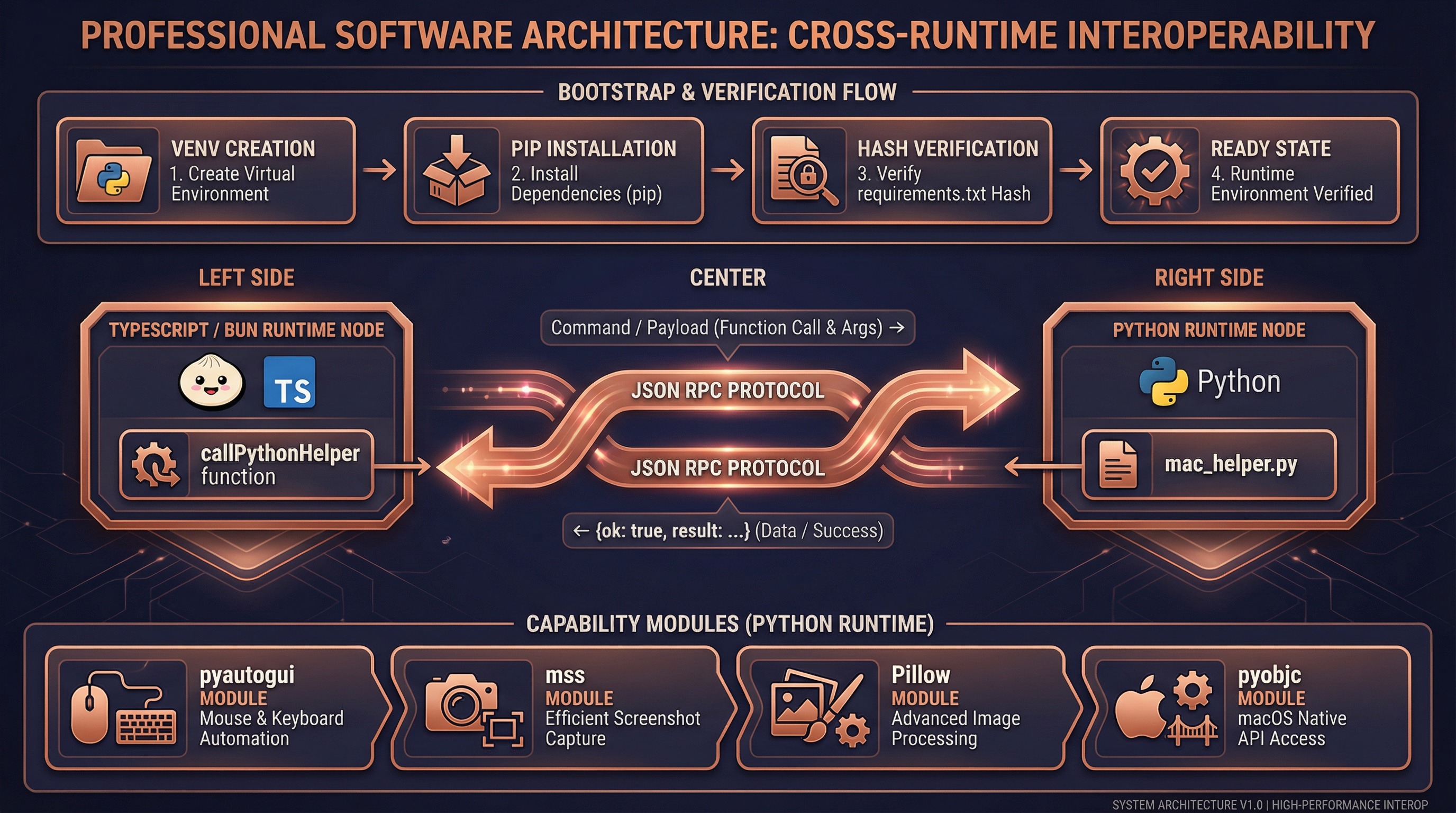
Original Claude Code uses compiled Swift native modules (.node NAPI plugins) to directly call macOS APIs. We replaced this layer with Python subprocess + JSON RPC:
TypeScript (Bun Runtime)                    Python (venv)
┌────────────────────┐                   ┌────────────────────┐
│  executor.ts       │                   │  mac_helper.py     │
│                    │   execFile()      │                    │
│  callPythonHelper  │ ──────────────→   │  main()            │
│  ('click',         │   command +       │    ├─ parse argv   │
│   {x:756,y:342})   │   --payload JSON  │    ├─ dispatch()   │
│                    │                   │    └─ click()      │
│  ← JSON.parse ──── │ ←──────────────   │       pyautogui    │
│  {ok:true,         │   stdout JSON     │                    │
│   result:true}     │                   │  json_output(...)  │
└────────────────────┘                   └────────────────────┘
Bootstrap Flow
First call to callPythonHelper() automatically completes environment setup:
ensureBootstrapped()
  │
  ├─ Check if .runtime/venv/bin/python3 exists
  │   └─ Missing → python3 -m venv .runtime/venv/
  │
  ├─ Check if pip is available
  │   └─ Missing → python3 -m ensurepip --upgrade
  │
  ├─ Compute SHA256 of runtime/requirements.txt
  │   └─ Compare with .runtime/requirements.sha256
  │       └─ Different → pip install -r requirements.txt
  │                      Write new SHA256 hash
  │       └─ Same → skip installation
  │
  └─ Ready, return venv Python path
Dependencies (runtime/requirements.txt):
| Library | Purpose |
|---|---|
mss | High-performance screen capture |
Pillow | JPEG encoding and image processing |
pyautogui | Mouse click, keyboard input |
pyobjc-core | macOS Objective-C bridge |
pyobjc-framework-Cocoa | NSWorkspace (app management), NSPasteboard (clipboard) |
pyobjc-framework-Quartz | CGDisplay (monitors), CGWindow (window list) |
Command Mapping
mac_helper.py (660 lines) implements the following commands:
| Command | Python Implementation | Return Value |
|---|---|---|
screenshot | mss.grab() + PIL.Image JPEG encoding | {base64, width, height, displayWidth, displayHeight} |
zoom | mss.grab(region) region capture | {base64, width, height} |
click | pyautogui.moveTo() + pyautogui.click() | true |
key | pyautogui.hotkey() / pyautogui.press() | true |
type | pyautogui.write(interval=0.008) | true |
drag | pyautogui.dragTo(duration=0.2) | true |
scroll | pyautogui.scroll() / pyautogui.hscroll() | true |
hold_key | pyautogui.keyDown() + sleep + pyautogui.keyUp() | true |
frontmost_app | NSWorkspace.frontmostApplication() | {bundleId, displayName} |
list_displays | CGGetActiveDisplayList() + CGDisplayBounds() | [DisplayGeometry...] |
open_app | NSWorkspace.launchApplicationAtURL_options_ | void |
read_clipboard | NSPasteboard.stringForType_() | string |
write_clipboard | NSPasteboard.setString_forType_() | void |
check_permissions | osascript + CGDisplayCaptureDisplay | {accessibility, screenRecording} |
Error Handling
# mac_helper.py unified error handling
def main():
    try:
        result = dispatch(command, payload)
        json_output({"ok": True, "result": result})
    except Exception as e:
        error_output({"ok": False, "error": {"message": str(e)}})
TypeScript side:
// pythonBridge.ts
const parsed = JSON.parse(stdout)
if (!parsed.ok) {
  throw new Error(parsed.error.message)  // → MCP tool error
}
return parsed.result
6. Screenshot-Analyze-Act Loop
A complete Computer Use interaction consists of multiple screenshot-analyze-act cycles:
Typical Interaction Flow
User: "Open NetEase Music and search for a song"

┌─ Cycle 1: Discover and open application ─────────────────┐
│                                                           │
│  Step 1: request_access                                   │
│    → Permission dialog, user authorizes allowed apps      │
│    → Set allowedApps, grantFlags                          │
│                                                           │
│  Step 2: screenshot                                       │
│    → Full screen capture → JPEG encode → base64           │
│    → Cache screenshot dimensions (lastScreenshotDims)     │
│    → Return to model                                      │
│                                                           │
│  Step 3: Model analyzes screenshot                        │
│    → "NetEase Music not on desktop, need to open it"      │
│    → Decides to call open_application                     │
│                                                           │
│  Step 4: open_application("com.netease.163music")         │
│    → Gates 1-9 all pass                                   │
│    → Python: NSWorkspace.launchApplicationAtURL_()        │
│                                                           │
└───────────────────────────────────────────────────────────┘

┌─ Cycle 2: Locate search box ─────────────────────────────┐
│                                                           │
│  Step 5: screenshot                                       │
│    → Full screen (app now open)                           │
│    → Update lastScreenshotDims                            │
│                                                           │
│  Step 6: Model analyzes screenshot                        │
│    → Vision identifies search box at (756, 342)           │
│    → Decides to click search box                          │
│                                                           │
│  Step 7: left_click({coordinate: [756, 342]})             │
│    → Gate 4: Hide non-allowlisted apps                    │
│    → Gate 5: Frontmost is NetEase Music ✓                 │
│    → Gate 6: tier=full >= click ✓                         │
│    → scaleCoord(756, 342) → screen coordinates            │
│    → Python: pyautogui.click(x_logical, y_logical)        │
│                                                           │
└───────────────────────────────────────────────────────────┘

┌─ Cycle 3: Type search query ─────────────────────────────┐
│                                                           │
│  Step 8: type({text: "my favorite song"})                 │
│    → Gate 6: tier=full >= keyboard ✓                      │
│    → Python: pyautogui.write("...", interval=0.008)       │
│                                                           │
│  Step 9: screenshot                                       │
│    → Confirm search results appeared                      │
│                                                           │
│  Step 10: left_click({coordinate: [...]})                 │
│    → Click target song                                    │
│                                                           │
└───────────────────────────────────────────────────────────┘
Coordinate Conversion
What the model sees vs actual screen are different coordinate spaces:
Physical screen (2560 x 1600, Retina 2x)
  ├─ Logical size: 1280 x 800
  └─ Physical pixels: 2560 x 1600

After imageResize:
  ├─ Scaled size: 1176 x 735 (≤1568px budget)
  └─ This is the screenshot size the model "sees"

Model outputs coordinate: [588, 368] (in image space)

scaleCoord conversion:
  x_logical = (588 / 1176) * 1280 + originX = 640
  y_logical = (368 / 735) * 800 + originY = 400

Python executes:
  pyautogui.moveTo(640, 400)  ← logical coords (macOS handles Retina)
Screenshot Cache & State Sync
bindSessionContext closure
  │
  ├─ lastScreenshot (in-memory)
  │   ├─ base64: JPEG data (for pixel validation)
  │   ├─ width/height: model-visible dimensions
  │   └─ displayWidth/displayHeight/originX/originY: display geometry
  │
  └─ AppState.computerUseMcpState (persisted)
      ├─ allowedApps: AppGrant[]        — authorized app list
      ├─ grantFlags: {...}              — clipboard/system shortcut permissions
      ├─ selectedDisplayId?: number     — selected display
      ├─ lastScreenshotDims?: {...}     — screenshot geometry (survives restart)
      └─ hiddenDuringTurn?: Set<string> — apps hidden this turn
7. Key Source File Index
vendor/computer-use-mcp/ (Original Code Layer)
| File | Lines | Responsibility |
|---|---|---|
types.ts | 622 | Permission model, session context, all type definitions |
tools.ts | 707 | 24 MCP tool schemas and parameter validation |
toolCalls.ts | 1600+ | Core: tool dispatch, 9 security gates, permission flow |
deniedApps.ts | 554 | 191 app classifications (browser/terminal/trading) and permission mappings |
sentinelApps.ts | 44 | Sensitive app warning labels (shell/filesystem/system_settings) |
mcpServer.ts | 314 | MCP server factory, session context binding, global lock |
pixelCompare.ts | 172 | Click target pixel validation (staleness guard) |
imageResize.ts | 109 | Screenshot dimension calculation (API image transcoder) |
keyBlocklist.ts | 154 | System shortcut interception (Cmd+Q, Cmd+Tab, etc.) |
executor.ts | 101 | ComputerExecutor interface definition |
subGates.ts | 20 | Feature flag sub-gate presets |
utils/computerUse/ (CLI Adaptation Layer)
| File | Lines | Responsibility | Patched? |
|---|---|---|---|
executor.ts | 231 | ComputerExecutor Python bridge implementation | Yes, rewritten |
pythonBridge.ts | 111 | Python subprocess management, venv bootstrap, JSON RPC | Yes, new |
hostAdapter.ts | 54 | HostAdapter implementation (permission checks, flag reading) | Partially |
gates.ts | 51 | Local capability enablement | Yes, modified |
wrapper.tsx | 300+ | Session context construction, permission dialogs, lock management | Unchanged |
setup.ts | 54 | MCP config initialization | Unchanged |
computerUseLock.ts | 216 | Global file lock (~/.claude/computer-use.lock) | Unchanged |
common.ts | 62 | Constants (server name, bundle ID) | Unchanged |
cleanup.ts | — | Turn-end cleanup (app restore, clipboard restore) | Unchanged |
toolRendering.tsx | — | Tool result UI rendering | Unchanged |
runtime/ (Python Runtime)
| File | Lines | Responsibility | Patched? |
|---|---|---|---|
mac_helper.py | 660 | All system interactions in Python | Yes, new |
requirements.txt | 6 | Python dependency declarations | Yes, new |
8. Design Trade-offs
Why Python Bridge?
| Dimension | Native Swift (.node) | Python Bridge |
|---|---|---|
| Performance | ~0ms (in-process call) | ~50-100ms (subprocess startup) |
| Readability | Not readable after compilation | 660 lines of clear Python |
| Modifiability | Requires Swift build environment | Edit .py files directly |
| Dependencies | Specific Bun version NAPI | Any Python 3.8+ |
| Cross-platform | macOS only | pyautogui/mss are natively cross-platform |
| User experience | Imperceptible | Imperceptible (model thinking takes 2-5s) |
Conclusion: The 50-100ms extra latency is completely negligible in Computer Use scenarios — the model typically takes 2-5 seconds for screenshot analysis and decision-making, so users won't notice the additional 100ms for underlying operations.
Approaches We Tried But Abandoned
Approach 1: Extract native .node modules
- Successfully extracted
computer-use-swift.node(ARM64 424KB) from the Claude Code binary - Synchronous methods worked, but Swift async method continuations never resumed
- Root cause: .node files compiled for Claude Code's built-in Bun, incompatible with user's Bun version
Approach 2: Empty stub packages
- Code compiled but all operations threw errors — no actual execution capability
Related Documentation
- Computer Use Guide — Usage, quick start, environment variables
- Source Fixes — Detailed records of other fixes and patches